

What if the domain you register, the email your team uses and the website your customers visit are three separate decisions, even when a provider offers them together? Choosing business email & domain hosting can feel confusing when the terms overlap and you’re also preparing to launch or operate a business in the UAE. Understanding what each service does can help you choose the right setup and avoid gaps.
A professional email address can match your business identity, while your website needs a place to operate. The key is understanding how domain registration, email hosting and website hosting connect while remaining distinct. This guide explains the differences and offers a practical framework for comparing mailbox needs, administration, security and room to grow.
You’ll also find a checklist of details to prepare before choosing a provider and ways to coordinate digital infrastructure with wider business setup tasks. EBMS Business Services LLC facilitates business email and domain hosting as part of its operational support. Confirm the provider, technical scope and implementation responsibilities directly with the team. With a clear plan, you can make informed choices and build an organised foundation for your business.
Key Takeaways
- Understand how a registered domain, email service and website hosting serve different roles in your business setup.
- Learn how DNS and MX records help connect your domain to the right email provider.
- Use a practical framework to compare business email & domain hosting options based on mailbox needs, administration, security and room to grow.
- Prepare for setup by defining communication needs and securely recording account ownership, administrator access and renewal details.
- Find out what to confirm with EBMS about provider choices, technical scope and implementation responsibilities.
Business Email & Domain Hosting: What Does a New Business Actually Need?
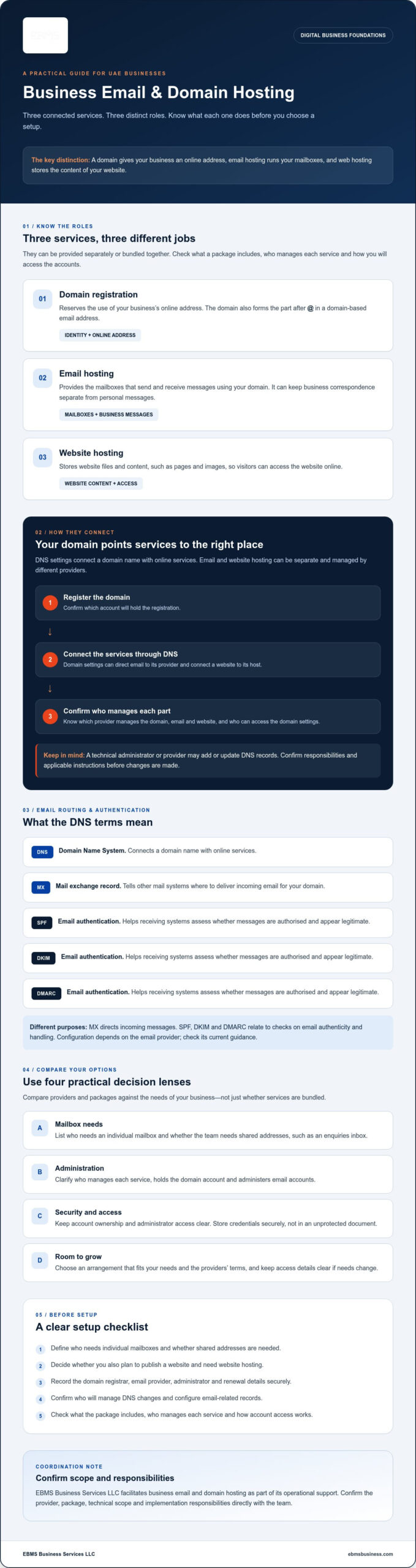
Before sending proposals or replying to customer enquiries, decide which digital essentials your business needs. Usually, you’ll need a domain for your business identity and an email service. If you plan to publish a website, you’ll also need web hosting. These services work together, but each has a different purpose and can be arranged separately.
In brief: Domain registration reserves the use of an online address, email hosting provides mailboxes that use that address, and web hosting stores the files and content that make a website available online.
How do a business domain, email hosting and website hosting differ?
Consider an address such as name@company-domain. The part after the @ symbol uses your domain, which identifies your business’s online address. Email hosting runs the mailbox that sends and receives messages. Website hosting stores website content, such as pages and images, so visitors can access it online.
The Domain Name System (DNS) helps connect a domain name to the relevant internet services. Domain settings can direct email to the appropriate provider, while website hosting serves a different purpose. Providers may sell these services separately or bundle some together. Before choosing a package, check what it includes, who manages each service and how you’ll access the accounts.
Why do founders arrange business email and domain hosting early?
A domain-based email address helps customers and suppliers recognise your business in routine communications. It also keeps business correspondence separate from personal messages. Before selecting a service, list who needs an individual mailbox, whether your team needs shared addresses such as an enquiries inbox, and who will administer the accounts.
Keep a secure record of the domain registrar, email provider, administrator and renewal details. Clear ownership and access information make future changes easier to manage, particularly if a team member leaves or your needs grow. Store credentials securely rather than placing passwords in an unprotected document.
Digital setup is one part of preparing a business to operate. If you’re considering a free zone structure, review the UAE free zone company setup information as part of your wider planning. The right sequence depends on your business plans, so coordinate company formation and operational requirements. EBMS facilitates business email and domain hosting among its wider operational support. Confirm the provider, package, technical scope and implementation responsibilities directly with the team.
How Business Email and Domain Hosting Work Together
After you register a domain, its settings help direct visitors and email traffic to the right services. These settings are managed through the Domain Name System (DNS). You don’t need to configure them from memory, but understanding their purpose helps you ask a provider or technical administrator useful questions.
What happens after a business registers a domain?
First, choose an available domain and confirm which account will hold its registration. Then decide which services to connect, such as an email provider and, if needed, a website host. DNS records may need to be added or updated so the domain points to those services. A provider or technical administrator may handle this, but the steps vary. Confirm who is responsible and what instructions apply before changes are made.
Email hosting and website hosting can be separate. For example, a business can use one service for email and another to store its website. Domain settings connect each service to the relevant destination. This arrangement offers flexibility, but you should know which provider manages each part and who can access the domain settings. Choose an arrangement that fits your needs and the providers’ terms.
What do DNS, MX, SPF, DKIM and DMARC mean?
DNS connects a domain name with online services. An MX record is a DNS setting that tells other mail systems where to deliver incoming email for that domain. SPF, DKIM and DMARC are email authentication mechanisms that help receiving systems assess whether messages are authorised and appear legitimate. Their configuration and recommended settings depend on the email provider, so check its current guidance.
These records are not interchangeable. MX relates to where incoming messages are directed; SPF, DKIM and DMARC relate to checks on email authenticity and handling. Incorrect or incomplete settings can affect email delivery, so don’t copy generic instructions without checking that they match your provider’s requirements. The provider’s support guidance or a technical administrator can clarify which settings apply.
For a business email & domain hosting arrangement, record which account controls the domain, who can change its DNS settings and which provider supports each service. To discuss how digital setup fits alongside wider business requirements, you can contact EBMS about digital setup support. Confirm the provider, technical scope and implementation responsibilities directly with the team.
How to Compare Business Email and Domain Hosting Options
Which option fits your business? Start with how you’ll communicate and who will manage the services, then compare providers against those needs. A useful comparison of business email & domain hosting looks beyond promotional claims to practical terms, access and support.
| Area | What to check |
|---|---|
| Mailboxes | Do you need individual mailboxes, shared addresses or both? Check how the provider handles each type. |
| Storage | Review mailbox capacity and what happens if a mailbox reaches its limit. |
| Administration | Check how administrators add or remove users, manage access and update account settings. |
| Security | Review available security controls, account recovery options and guidance for protecting access. |
| Support | Confirm how to contact support, what assistance it covers and where to find current instructions. |
| Growth flexibility | Ask whether you can adjust users, storage or services if your requirements change, and check the relevant terms. |
Which email hosting features should a business assess?
Consider the devices your employees use and whether the service supports access in a way that suits their work. Check mailbox limits, user administration and account recovery before you commit. If you need shared addresses, confirm how access and responsibility are managed rather than assuming they work like individual mailboxes.
Read the provider’s current documentation for security controls and technical support, then compare those details with your actual requirements. Avoid paying for features you may not use, but don’t overlook capabilities your business needs to communicate and administer accounts appropriately.
What should a business check before choosing a domain provider?
Make sure the business can access the registrar account and that you understand who has authority to change domain settings. Review the provider’s documentation for renewal terms, recovery procedures, support arrangements and conditions for transferring a domain. Keep account and renewal details securely recorded, with access available to an appropriate administrator.
Check that the proposed domain fits your business identity and the email addresses you intend to use. Before registering or transferring it, confirm the name’s availability and review the registrar’s terms. Choose based on clear ownership, manageable administration and suitability for your needs, not promotional language alone.
A Practical Checklist for Setting Up Business Email and Domain Hosting
A little preparation can make setup easier to coordinate with your wider business launch. Use this sequence to clarify what you need, confirm who is responsible and keep essential account information organised.
- Define your communication needs. Decide whether you need individual mailboxes, shared addresses or both. Consider how staff will access email and who will manage accounts, without assuming a fixed number of users.
- Prepare your business identity details. List preferred domain names and the business name you intend to use in communications. Choose email address formats that will be clear to customers and suppliers, such as role-based addresses for shared enquiries.
- Decide whether you need website hosting now. Email hosting and website hosting can be arranged separately. If you’re not ready to publish a website, clarify whether you can add that requirement later under the provider’s terms.
- Compare providers and confirm responsibilities. Check what each service includes, who will configure domain settings and how to access support. Ask the provider to confirm required configuration, security and migration steps before changes are made.
- Assign account ownership and administrator access. Decide which person or business account will hold the domain and email service. Give administrative access only to appropriate people, and store credentials in an approved secure system rather than an unprotected document.
- Test the setup. After the provider’s configuration is complete, send a test message to an external address and reply to it. Check that you can send and receive messages, then follow up with the provider if anything appears incorrect. Testing helps identify issues, but doesn’t guarantee future delivery.
- Record the details securely. Document the domain registrar, email provider, administrator, renewal dates, support channels and account recovery methods. Keep the record current and make sure an authorised person can find it if the main administrator is unavailable.
Keep the setup record focused on operational details, not exposed passwords. If responsibilities change, update the named administrator and review who still has access. Before transferring a domain, migrating mail or changing settings, check the provider’s current instructions and recovery process.
Technical assistance may help when coordinating account setup with other business requirements. You can review EBMS’s IT services and digital support information, then confirm directly which tasks can be facilitated and who will carry out each step. For help coordinating business email & domain hosting with your wider setup, contact EBMS to discuss your requirements.
How EBMS Can Help Coordinate Business Email and Domain Hosting
Digital infrastructure is one part of getting a business ready to operate. EBMS Business Services LLC facilitates business email and domain hosting as part of its broader operational support, alongside business setup and company formation services. This can help you consider digital requirements within your wider plans rather than treating them as an unrelated task.
The specific arrangement matters. Confirm the hosting provider, package and implementation responsibilities directly with EBMS before proceeding. Ask what the support covers, what the selected provider will handle and which tasks, if any, remain with your business or technical administrator.
What should businesses confirm with a support partner?
Before deciding, ask which steps EBMS can facilitate and which sit with the email or hosting provider. Confirm available provider options, who will hold account ownership, who can make technical changes and what support arrangements apply. Request clear information about the proposed scope and any applicable costs directly. Don’t assume particular features or responsibilities are included.
Agree how you’ll receive and retain account details, renewal information and recovery instructions. These practical details can reduce uncertainty later, especially if the person managing the accounts changes.
How does digital setup fit into wider business operations?
Domain and email decisions can be planned alongside company formation and other operational needs, but that doesn’t mean every service is bundled. Your priorities will depend on your chosen setup route and how your business plans to operate. If a free zone is the route you’re considering, review the Free Zone business setup information as part of your planning.
A corporate bank account is another distinct operational consideration, not a feature of domain or email hosting. Keep it separate when mapping your business requirements and confirm the relevant scope with the appropriate provider.
EBMS can discuss how business email and domain hosting fits alongside wider business setup requirements. Confirm the available support, provider arrangements, technical scope and responsibilities by contacting EBMS about business email and domain hosting.
Build a Clear Digital Foundation for Your UAE Business
Choosing business email & domain hosting starts with understanding what each service does, then matching the setup to your communication needs. Compare mailbox capacity, administration, security and support, and check domain ownership, renewal and recovery terms before committing. Once configuration is complete, test sending and receiving messages, then keep account and renewal details securely documented.
Plan these decisions alongside your wider business setup, while confirming which tasks belong to your business, the provider or a support partner. EBMS Business Services LLC facilitates email and domain hosting as part of its corporate operational support, and supports businesses from company setup through post-setup requirements. Confirm the provider, scope, technical arrangements and costs directly. EBMS also emphasises transparent communication and multilingual assistance.
For help considering how digital requirements fit with your business plans, contact EBMS to discuss your business email and domain hosting requirements. An organised setup gives you a practical foundation for moving forward.
Frequently Asked Questions
What is the difference between a business domain and business email hosting?
A business domain is the registered online name used for your web address and custom email addresses. Business email hosting provides the mailboxes that send and receive messages using that domain. For example, the domain forms the part after the “@” in an address such as name@company-domain. Website hosting is separate: it stores the files and content needed to make a website available online.
Can I use a business email address without hosting a website?
Yes. You can use a custom-domain business email address without publishing a website. The domain and email service need to be connected through the relevant settings, but website hosting serves a different purpose and can be arranged separately. If you’re not ready to build a website, ask your provider what you need for email alone and whether any services in a proposed package are optional.
Do I need a domain before setting up business email?
For an email address that uses your business’s own domain, you’ll need access to that domain so it can be connected to an email service. You can usually choose the email provider before or after registering the domain, but confirm the provider’s setup requirements and account ownership arrangements. If a service offers domain registration with email, check the terms and who will control the domain account.
How do DNS and MX records affect business email?
DNS connects a domain name with online services. An MX record is a DNS setting that directs incoming email for the domain to the appropriate mail service. Other records may support email authentication. The required values depend on your provider, so use its current instructions or ask its support team or your technical administrator to confirm the settings. Incorrect changes may affect email service, so check before editing records.
How much does business email and domain hosting cost?
There isn’t one fixed cost for business email and domain hosting. The amount depends on the selected provider, plan, mailbox requirements and domain registration or renewal terms. Some services bundle email with other tools, while others provide email separately. For an accurate comparison, request current prices in AED and check what the quote includes, how renewals are priced and whether optional services carry separate charges.
Can EBMS help with business email and domain hosting in the UAE?
EBMS Business Services LLC facilitates business email and domain hosting as part of broader operational support. Confirm the specific provider, package, technical scope and implementation responsibilities directly with EBMS. Ask which steps EBMS can facilitate, what the selected provider handles and what your business must manage. This can help you coordinate digital requirements with company setup and other operational planning.
What should I check before transferring a business domain?
Before transferring a domain, confirm who owns and can access the registrar account, then review the current provider’s transfer, renewal, recovery and support terms. Identify who will manage the transfer and check whether email or website settings need attention during the change. Keep relevant account details and configuration information securely available, and ask both providers to confirm their current requirements before starting. Don’t assume transfer steps are identical across providers. To discuss how EBMS can help coordinate your digital setup, contact the team.